
TricksTube Best Cool Pc And Mobile Tricks!
Showing posts with label Facebook. Show all posts
Showing posts with label Facebook. Show all posts
Sunday, February 20, 2011
Funny Facebook Status Updates (Rated)

Useful Facebook Tricks
Decluttering Your Homepage
If you're like me, then you hate it when your homepage gets cluttered with all the junk activity of your friends playing games on facebook. You know what I mean. Those "So and so robbed Don Purtino's mafia in Mafia Wars" or "Blah caught a Scavenger mouse in MouseHunt". No offense to those who play these games, I'm sure they're lots of fun, but the rest of us don't want our homepage to be filled with these stories that we can't see our friends' important activities amidst all the clutter.
Here's the good news: You can configure your homepage so it doesn't display these stories anymore! If you hover your mouse on a story on your homepage, a Hide tab will appear on its upper right corner. Click on it and you are given two options: (1) Hide the person publishing the story or (2) Hide the application the story is from. I usually hide the application. In our examples above, that would be: Hide Mafia Wars and Hide MouseHunt. Voila! You will never see Mafia Wars and MouseHunt on your homepage again! Nice, huh?
Cleaning Up Your Wall
Has your wall ever gotten hijacked by notifications such as "Blah started the quiz: Dr. Phil's Personality Test" then "Blah completed the quiz: Dr. Phil's Personality Test with the result The Vain, Self-Centered Leader" followed by a big story stating the same thing. Get rid of the duplicates by clicking on the Remove button that appears to its right when you hover on it! I've seen so many walls overrun by these useless notifications. I also remove the notifications that appear on my wall when I change some information on my profile. I like things neat and organized. (Which is why I hate that the current Facebook rearranges posts on my wall every now and then instead of following a chronological order.)
Tagging People In Notes
Have you ever wondered if anybody bothers to read your notes on Facebook? It's like, nobody comments. And you wonder if your friends know you ever wrote it? That's happened to me, and I've realized that it's probably because my friends' homepages are so cluttered with the aforementioned junk that they didn't notice the note I wrote. So now I tag the people for whom the note was intended.
Well, strictly speaking, you only tag people in a note when you've mentioned them or written about them in it (just like you tag people in pictures and videos when they are in it), but I guess we can stretch the tag function a little. When you tag a person in a note, picture, or video, it appears on their wall so they have no chance of missing it. Unless they never look at their wall, which is pretty much impossible.
How do you tag people in notes, you ask? Easy. When you write a new note, you'll find "Tag people in this note" to the right of the title. When you type people's names into the blank, they appear under "In this note" and you've tagged them. When you publish the note, it will appear on their walls.
Writing Notes
Okay, I assumed in #5 that you know how to make notes. For those who don't or have no idea what notes are, they're like mini-blogs where you can write anything for your friends to read. Where do you find the option to write a note, you ask? Well, by default it is bookmarked on the lowest portion of your profile. It's the icon that looks like a page on a spring-bound notebook. (Hover your mouse over the icons until you find "Notes".) When you click it you're taken to your friends' notes by default. There's a "Write a new note" button on the upper right corner. That's what you're looking for if you want to start a new note.
To view notes you've already written, click My Notes. Or you can click on your Notes tab in your profile. The "Notes about me" portion contains all the notes in which you are tagged.
Thursday, December 30, 2010
Trick to Get Back Hacked Facebook Account

These days there are many ways a facebook account can be hacked easily and many people are falling victims to these hackers. Its very easy to get trapped by hackers, they use more sophisticated methods to do it. And are you in such a situation? Did some one hacked your facebook account ?
There should be any thing to worry if it is yes. Before losing hope there are some things that can be done to get your Hacked Face Book Account Back.
First of all you can try resetting your account password on facebook. But this could help only in rare cases, because most hackers are intelligent and they surely will have changed the default email address. But if some body have accidentally (though the chances are extremely narrow) logged into your account and has changed only the password of your face book account, this might help you in recovering your account password and gain access to your compromised account.
But things get much more worse when the hacker changes the email address in your Face Book Account. You’ll no longer be able to reset the account password and gain access to the account.
But there is a way.
Face Book provides a contact page for you to help you to in recovering the hacked account .
Visit:-
http://facebook.com/help/contact.php?show_form=account_compromised
Inside the contact Form You need to Fill in the Following Details Correctly.
Full name on the account:
Enter the Full Name as you have given in Your Face Book Account.
Network(s) the account belongs to:
Enter the names of the networks you have joined. Include as many as possible.
Email addresses that may be affiliated with the account:
This is the email address you used as username to login to face book.
Your contact email address:
Enter a email address you can be contacted by facebook. They will contact you regarding this issue.
URL (web address link) of the profile page:
Give the link to your facebook profile address.
Description and steps to reproduce the issue:
Provide as much as information in here regarding how your face book account was hacked etc. It is recommended to include the time and date when you were able to access your account for the last time.
How to Hide Facebook Friends list from Public view
In response to your feedback, we’ve improved the Friend List visibility option described below. Now when you uncheck the “Show my friends on my profile” option in the Friends box on your profile, your Friend List won’t appear on your profile regardless of whether people are viewing it while logged into Facebook or logged out. This information is still publicly available, however, and can be accessed by applications. Thanks again for your comments and suggestions.

Here’s how you can hide your Facebook friends from public view.
1. Click on Profile on the blue bar a the top of the screen after you login to facebook:

2. Scroll down to the beginning of your Facebook friends and click on the pencil to the right of the word Friends:

3. Uncheck the box that says “Show Friend list to everyone”:
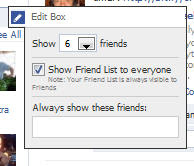
Just changing this small setting will make your Facebook friends invisible from public view and search engines.

Here’s how you can hide your Facebook friends from public view.
1. Click on Profile on the blue bar a the top of the screen after you login to facebook:

2. Scroll down to the beginning of your Facebook friends and click on the pencil to the right of the word Friends:

3. Uncheck the box that says “Show Friend list to everyone”:

Just changing this small setting will make your Facebook friends invisible from public view and search engines.
Monday, December 27, 2010
Facebook Free Emoticons Without Any Addons

Facebook have some inbuilt emoticons just like yahoo messenger which are not known by many people. Use this shortcut keys of emoticons in the chat-box of face book for cool emoticons and for fun.
Some of the secret code of facebook emoticons are given below. So have a cool chat with your friends with cool emoticons.

Enjoy!!!! You can also try the http://facemoods.com/ and install a Addon for your Facebook within the Firefox for even more Emoticons. :)
Thursday, December 23, 2010
How to earn money on FACEBOOK

Hi im ur cool cool friend sanket tupe,
Every one knows that Facebook is one of the biggest and most successful social networking site all over the world. It has a wide and varied audience and the demography of the facebook population is more or less the general buying public-young teenagers to middle aged working class individuals.
You may have already realized the potential of this website in terms of marketing and sales and you are definitely right. Now You can use facebook to earn money and market your own goods and services. Here are five ways how to make money on facebook. FOR all types of people.
Now these are not part of any scam or “get rich quick” scheme that you may have read or heard about. Facebook is not a marketplace per se, and most of the time the “promote your blog or affiliate on another person’s wall” will not get you the results that you want. Rather, these tips use the recognized applications already available on the site so you can optimize your stay on facebook.
* CafePress Listings. If you are not very familiar with CafePress, it is actually an application in facebook that allows you to design and sell CafePress items. You can create your very own CafePress account from within facebook and you can also sell your products by offering them to people within facebook, whether they are contacts or not.
* Use e3Buy Auction. This is an application where you can sell off things that you want to sell. You can start making money with this feature because people who visit your site will be able to see this application on your profile. So for them to be able to see it, what you need to do is to visit as many profile pages as possible to let other people know you exist.
* Use FlameTunes. Love music? Maybe you are a DJ or someone who just loves to mix and match good music. With this facebook application, you can play and record music with whatever instrument you have then sell it to your contacts and other people on facebook. You can also use mixers or other equipment so you have better flexibility and sound quality.
* Garage Sale. This is an application that is as trusty as air. Garage Sale is a very easy way to sell your old belongings and other second hand items to other people. You can also sell other things that you produce like custom made bead bracelets or other accessories.
* Cash Cliques. This application will pay you to visit or click onto and leave a comment in a certain number of advertisement websites. Other than this pay-per-click scheme, you can also earn by referring or other people to visit the site.
Their are some other traditional ways to earn fro facebook like:
* From branding and selling your product.....
* Put an advertising space on your profile page – If you think you are interesting enough to look for then yes you can easily try this option.Just create an advertisers space and advertisers would be interested in placing their ad banners on the space.
Facebook is definitely something that is taking the industry by storm. Everyone loves being on facebook and enjoying the different applications available, so why should you miss out on the opportunity as well? With the help of these applications, you can earn money & gain more contacts. enjoy..
Please share this on Facebook to share this post see below post options.
Wednesday, December 15, 2010
ibibo Farms Games – Indian Version of Facebook FarmVille
 ibibo farms is a social game that ibibo has launched to compete with Facebook’s Farmville. In ibibo Farms, each user manages and owns a piece of land, grows crops, harvests crops and earns virtual money. Players aspire for the top leader board position within their online social graph.
410,000 pieces of fruit and vegetables are harvested every day, daily 80,000 eggs are produced and about 38,000 buckets of milk our produced on the ibibo Farm game. Players can steal crops from their friends’ farms. That is the fun part of the game. Around 82000 fruit and vegetables are stolen everyday from friends’ farms on the ibibo Farm game.
ibibo Farms Mobile provides mobile access to the games. too. Visit the ibibo Mobile portal and enter your phone number to receive a direct link to play the games. ibibo Farms is available as a mobile app at getjar.com as well.

Features
* Grow your crops: You can buy seeds from the local store, sow and maintain your farm regularly.
* Harvest & Sell: Once your crop is grown, harvest it and sell it to earn money.
* Steal from friends: Steal crops from your friends farms plant weeds and worms on their farm.
* Decorate your farm: You can decorate your farm by additional accessories, this also earns you extra points.
* Buying a dog that guards the farm and saves your crops from being stolen.
* A hen that lays egg if you feed it and you can sell the eggs to earn more and likewise a cow for milk.
Tuesday, December 14, 2010
How Suggest any Page to All Friends in Facebook.

Want to Suggest any Page to Friends in Facebook, but Your Friend List is too Long to Select all ???
Here I Am, with A New Hack:
Step 1: Copy the Below Code:
javascript:fs.select_all();
Step 2: Open the Fan page that you want to Suggest to Your Friends.
Step 3: Click on "Suggest to Friends" on Left Side of Page.
Step 4: Press ALT+D (to go to Address Bar)
Step 5: Press CTRL+V (To Paste)
Step 6: Hit ENTER Key
You Are Done !
You Will See, All your Friends are selected at ONCE
Monday, November 22, 2010
How to Display Selected Friends Only on your Facebook Profile Page

While many facebook users have hundreds, if not thousands of facebook friends Some people may find they are looking at random faces from years gone by every time the look at there facebook profile. This neat little trick will show you how to display certain friends that you select all the time on your facebook profile. You can also select how many friends are shown.
A little-known feature in Facebook that enables you to decide who shows up in that Friends box on your facebook profile page. Click that “edit” pencil in your Friends box and type the names of your best friends in the box that says “Always show these friends”
Facebook is full of little known tricks like this and it is obvious when you know its there but untill you know it is a secret.
Thursday, November 18, 2010
FarmVille Creator To Launch CityVille Soon on Facebook

Zynga, the company behind massively successful Facebook games like FarmVille, FrontierVille or Mafia Wars, is getting ready to launch a brand new game called CityVille, which will see Facebook members start their own cities and take care of them and their inhabitants.
Zynga is ready to expand its social gaming grasp, and revealed that CityVille will be launched "in the following weeks" on Facebook, as well as on its own website, Cityville.com.
The title bears some similarities to other existing games, including SimCity, obviously, another popular Facebook game Social City, and even Zynga's own FarmVille.
The game tasks players with the role of a city planner, and they must construct buildings, from houses to post offices, fire departments, schools, restaurants or shops, on empty plots of lands.
The company didn't detail what tasks players must fulfill, but it seems that food will play a large role in keeping inhabitants happy and your city thriving.

You can even set up farms in CityVille, in order to harvest food, or import goods from other real-life cities like Shanghai, London or Rome.
The social aspect of CityVille will be even larger than in previous Zynga titles, like FarmVille or FrontierVille, as players can set up their own franchises or shops in the cities of their friends, not to mention the fact that you can visit other cities and help them out with clearing land, raising buildings or donate supplies to your friends.
CityVille, like any Facebook game, will offer you the ability to post messages on your wall, and send invitations to your friends in order to have them join in on the fun, thus helping you develop your own city and have the best one around.
Overall, if you're really into Facebook games and you have time left after tending to your crops in FarmVille, your frontier home in FrontierVille or your mob family in MafiaWars, then Zynga's new CityVille is right up your alley.
Wednesday, November 17, 2010
Facebook Messages (new) – Email @facebook.com, Chat and Text

Facebook, the world’s largest social networking site, announced the roll out of an all-in-one messaging service that allows its members to communicate with people outside the social network. The new system will let users own “@facebook.com” addresses. It will let users send and receive instant and text messages in addition to standard email and Facebook notes. Facebook is rolling out the new Messages to everyone gradually. You may request an invitation.
With the New Messages, get all your messages together -- texts, chat, facebook messages and email together in one simple conversation. You can include email by activating your optional Facebook email address. With the new messages system, you can control who can send you messages through your privacy settings. Your full conversation history will be available, irrespective of whether you send email to text message or facebook message. You can see everything you have ever discussed with each friend as a single conversation. The messages from unknown senders and bulk email go into the Other folder. No need to have a subject lines or other formalities for simply sending a message to your friends.

According to Facebook CEO Mark Zuckerberg, more than 350 million of Facebook’s half-billion users now actively send and receive messages on facebook website. More than 4 billion messages get sent everyday through Facebook. He expects that, many new generation users will shift to an integrated, cross-platform mode of communications over the longer term, such as the new messaging service.
Its new product will automatically route messages from a person’s most frequently-contacted acquaintances into a main inbox, with messages from other contacts pooled in a separate inbox. Unlike traditional emails, all the messages between two people are threaded together into one long-running conversation, without having any significance to subject line.
Users will also be able to view Microsoft Office documents as attachments to their messages directly.
Friday, November 5, 2010
How to Display Selected Friends Only on your Facebook Profile Page

While many facebook users have hundreds, if not thousands of facebook friends Some people may find they are looking at random faces from years gone by every time the look at there facebook profile. This neat little trick will show you how to display certain friends that you select all the time on your facebook profile. You can also select how many friends are shown.
A little-known feature in Facebook that enables you to decide who shows up in that Friends box on your facebook profile page. Click that “edit” pencil in your Friends box and type the names of your best friends in the box that says “Always show these friends”
Facebook is full of little known tricks like this and it is obvious when you know its there but untill you know it is a secret.
HOW TO: Hide Status Updates From Certain People Facebook

Using Facebook’s general privacy settings (find these by hitting “account” on the top right of a Facebook page) you can select whether everyone, just friends or friends of friends can see your status updates. However, there is a way to narrow those options down even further.
You can select specific friend lists to see your status (relevant for work, special interest groups, etc.) or even individual people by name, which is useful for anyone organizing a surprise party.
To take advantage of these options, click the padlock icon just below your “what’s on your mind” box on your wall and a drop down menu should appear. Selecting “customize” will bring up more options such as “make this visible to” and “hide from” with the option to make your selection a default.
Subscribe to:
Posts (Atom)